¶ Purchase Request
At a Glance
Module purpose: Multi-level, budget-aware internal demand workflow (Draft→Submitted→Under Review→Approved/Rejected/Sent Back) that hands a vendor-allocated requirement to procurement · Audience: Requestor, Department Head, Budget Controller, Finance, Purchaser, Procurement Manager, Auditor · Key entities/tables:tb_purchase_request,tb_purchase_request_detail, approval history, pricelist allocation, purchase-request/my-approval · Sub-pages: 15
¶ 1. Overview
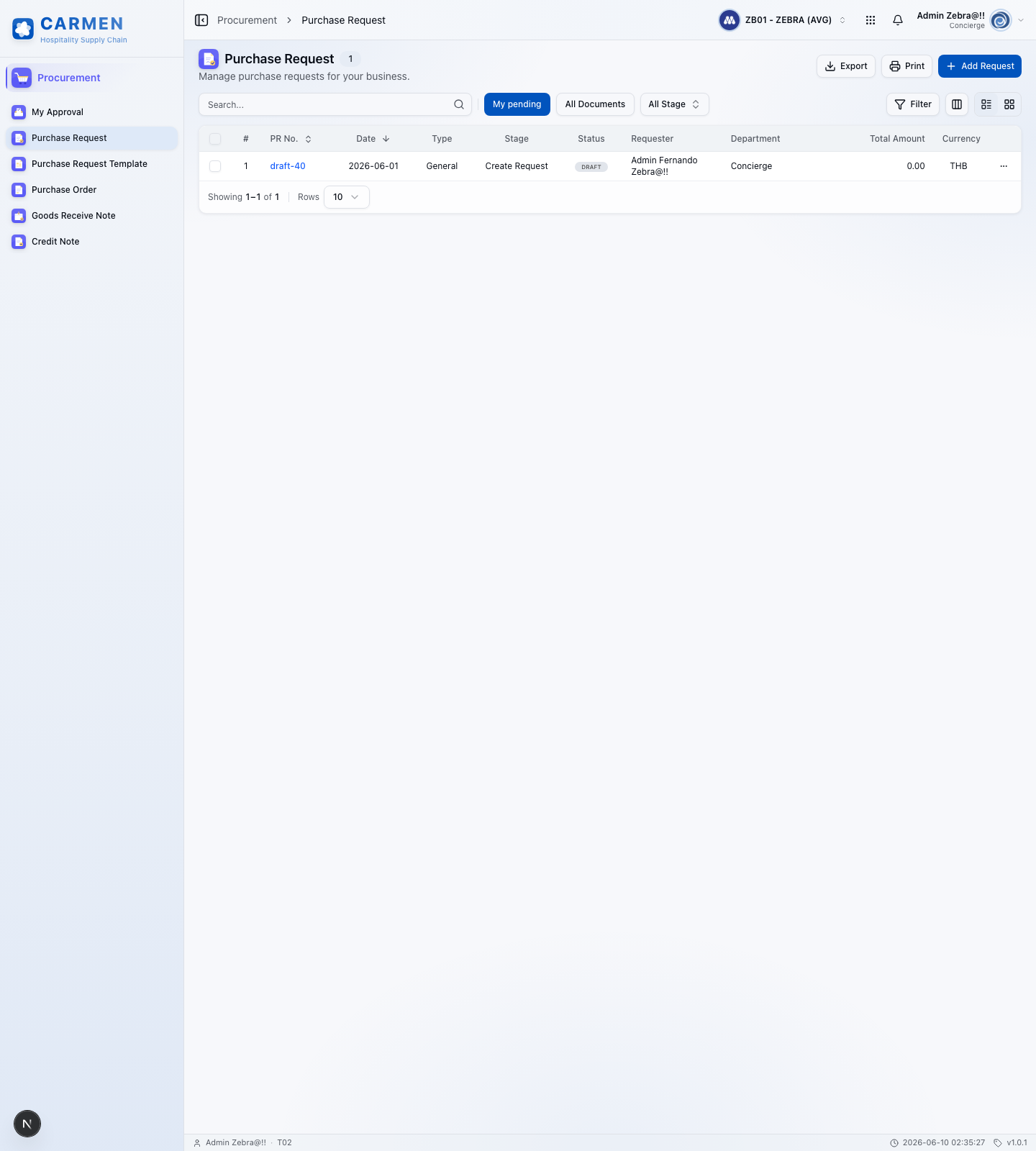
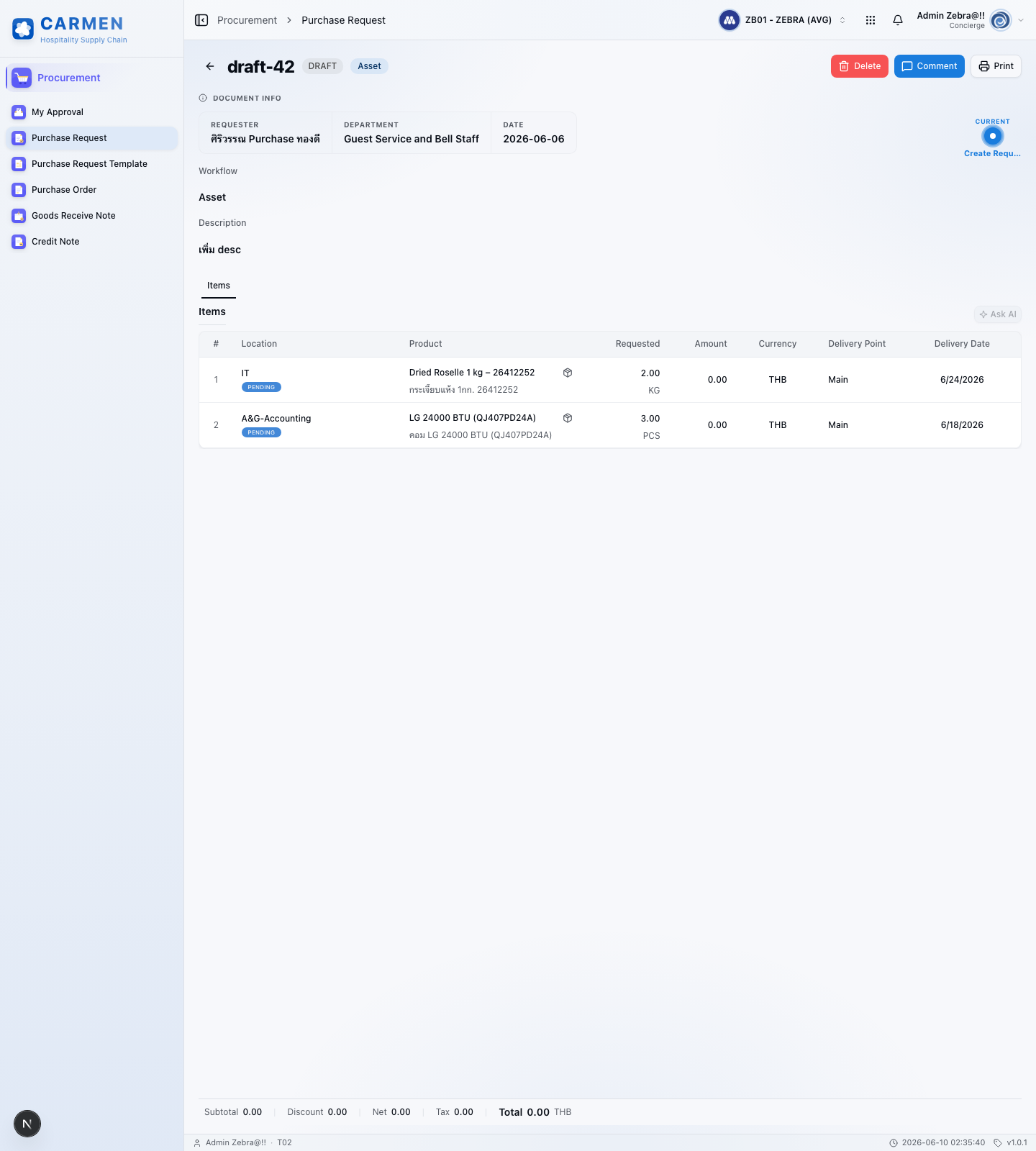
A Purchase Request (PR) is the internal demand document raised by an operating department to authorise the procurement of goods or services before any external commitment is made to a vendor. Each PR has a header — auto-generated reference number, request and required delivery dates, PR type (General Purchase, Market List, Asset), requestor and department, job/cost code, delivery point, description and justification, currency and exchange rate — and one or more item lines that carry the product or free-text description, store location, requested and approved quantities, FOC quantity, unit of measure, estimated unit price, discount, tax treatment, computed line totals, and links to inventory and PO history. The header rolls the lines into subtotal, total discount, total tax, and grand total figures in both transaction and base currencies.
The PR lifecycle is workflow-driven: Draft (editable by the requestor, no budget or stock impact) → Submitted (routed through the approval chain, a soft budget commitment is created) → Under Review (in the hands of one or more approvers) → Approved (cleared for procurement and available for conversion to a purchase order) or Rejected / Sent Back (returned to the requestor with comments). Approval is multi-level and amount-driven — typically department head first, then budget controller, then finance review for high-value PRs, then final procurement sign-off — with delegation-of-authority rules to keep the chain moving when an approver is unavailable. Submitted PRs cannot be voided; cancellation only happens through the workflow reject path, preserving the audit trail.
The PR is the upstream demand signal in the procure-to-pay chain. It captures what is needed, for whom, by when, and roughly how much, then hands an approved, costed, vendor-allocated requirement to procurement. The Allocate Vendor function selects the preferred supplier from the pricelist using a prioritised rule set (vendor rank, then lowest price, then last-receiving history), pulls tax rate and unit price from the pricelist, and the approved PR — with its approved quantities and selected vendor — is then converted into a purchase order to commit externally. Budget is reflected as a soft commitment at submission, hardening into a real commitment only once the PO is raised.
¶ 2. Business Context
Hospitality procurement runs on tight margins and high-volume, low-value purchases across many cost centres, so the PR is the control point that prevents uncontrolled spend before any external commitment is made. By forcing every purchase intent through a documented, budget-aware, multi-approver workflow — with mandatory requestor, department, delivery date, justification, and unique reference number — the PR enforces spending policy upstream of the vendor and gives finance a forward-looking view of committed spend. Soft-commitment accounting on submission means budget consumption is visible the moment a PR is raised, not just when goods are received, which is what keeps department-level overspend from happening by accident.
The module is also the integration spine for everything downstream. PR data flows into the budget module (availability checks and soft commitments), the inventory module (on-hand, on-order, reorder level, last price visible to the requestor), the vendor module (pricelist lookup, vendor ranking, price comparison), the workflow engine (configurable approval routing and notifications), and the purchase order module (PR-to-PO conversion with full traceability). Document management (comments, attachments, activity log) gives every PR a complete audit trail — who created it, who changed it, who approved or rejected it and when — which is what auditors look for during compliance review and what operators rely on when investigating procurement issues.
Financial accuracy is enforced at the calculation layer rather than left to the UI. Item subtotal, discount, net, tax, and total are each rounded at the line level using banker's rounding with 3 decimals for quantity, 2 decimals for money, and 5 decimals for exchange rates; PR-level totals roll up from rounded line values; cross-currency receipts dual-post with explicit conversion rounding. The system supports tax-inclusive and tax-exclusive pricing, separately-flagged manual adjustments to discount and tax, and tax derivation that varies by allocation path (manual product selection uses the product tax rate, auto-allocation uses the pricelist tax). This rigour is what allows the PR total to reconcile cleanly against the eventual PO and GRN.
¶ 3. Key Concepts
- Approval Level: A configurable stage in the PR workflow with an assigned approver role and amount threshold. Typical levels are department head (mandatory for every PR), budget controller (validates against budget availability), finance review (mandatory for high-value PRs above a configured threshold), and final procurement sign-off. Delegation rules route approvals to a deputy when the primary approver is unavailable, and the entire path is recorded on the activity log.
- Budget Check: The availability validation performed against the budget category for the requestor's department and cost centre at submission. The system surfaces total budget, soft commitments from other open PRs, soft commitments from open POs, hard commitments, and resulting available budget, then flags PRs that would exceed availability — without blocking submission — so finance can review and override or reject.
- Soft Commitment: The provisional budget reservation created when a PR is submitted. It reduces available budget for planning purposes but is reversible (a rejected or cancelled PR releases its soft commitment). Soft commitments harden into firm commitments only when the PR is converted to a purchase order.
- Preferred Vendor / Allocate Vendor: The system function that selects a vendor for each PR line using a prioritised rule set — first by vendor ranking on the pricelist, then by lowest unit price, then by most-recent receiving history — and populates unit price and tax rate from the corresponding pricelist row. Users can override the allocation manually, in which case the pricelist's tax is applied. If the line's Adjust checkbox is set, prices are no longer auto-updated by re-allocation.
- PR Type: A classification (General Purchase, Market List, Asset) that drives approval routing, account coding, and downstream PO behaviour. Market List PRs are typically high-frequency, low-value perishable orders with a streamlined approval path; Asset PRs go through capital-expenditure approval; General Purchase covers everything else.
- Approved Quantity vs. Requested Quantity: Each PR line carries both. The requestor enters a requested quantity; approvers can adjust the approved quantity down (or, with authority, up) during review without sending the PR back. The approved quantity is what flows into the purchase order on conversion.
- FOC (Free of Charge): A line-level field for vendor-supplied items that arrive at zero price (samples, promotional bonuses). FOC quantities are tracked separately from the priced quantity, are excluded from the PR subtotal, but appear on the resulting PO and GRN so the receiving side records them in inventory.
- Conversion to PO: The procurement step where one or more approved PRs are turned into a purchase order — single-PR conversion, multi-PR consolidation (when vendor, currency, and terms agree), or partial conversion of selected lines. The PR retains a link to the resulting PO(s), and remaining unconverted lines stay open until fulfilled or cancelled.
- Cancellation / Reject: A PR in
Draftstatus can be voided directly by the requestor. Once submitted, cancellation only happens through the workflow — an approver chooses Reject (terminates the PR with a reason) or Send Back (returns to the requestor for revision and re-submission). Split & Reject lets an approver reject specific lines while approving the rest. The audit trail and soft-commitment reversal are handled automatically by the workflow. - Price Comparison: A line-level view that lists every vendor on the product's pricelist with rank, unit price, discount, FOC, quantity-break range, and unit of measure, so the requestor and approvers can see and override the auto-allocated vendor with full context.
¶ 4. Roles and Personas
| Role | Responsibility |
|---|---|
| Requestor | Hotel or department staff member who initiates the PR. Creates the request, selects PR type, adds items with quantity, unit, estimated price, delivery date, and justification, attaches supporting documents, and submits for approval. Tracks status and responds to send-backs. |
| Department Head / Department Manager | First-level approver in the workflow. Reviews PRs originating from their department, validates business need and budget alignment, adjusts approved quantities if required, and approves, rejects, sends back, or split-rejects individual lines. |
| Budget Controller | Validates submitted PRs against budget availability for the relevant category and cost centre, reviews soft-commitment impact, and approves or escalates PRs that exceed thresholds. |
| Finance Officer / Finance Manager | Reviews financial aspects of the PR — currency, exchange rate, tax treatment, calculation accuracy — for high-value PRs above the configured financial-review threshold, and signs off before procurement conversion. |
| Procurement Officer / Purchaser | Receives approved PRs, validates vendor allocation and pricing against the pricelist, consolidates PRs into purchase orders, and converts approved PRs to POs. Manages vendor follow-up for clarifications. |
| Procurement Manager | Oversees the procurement function, approves high-value or strategically sensitive PRs, manages vendor relationships and ranking, and tunes the Allocate Vendor rules. |
| System Administrator | Configures workflow stages, approval thresholds, delegation rules, PR-type defaults, tax codes, currency rates, and integration with budget, inventory, vendor, and PO modules. Manages user roles and permissions. |
| Auditor | Read-only access to PRs and the activity log to verify policy compliance, segregation of duties, and budget-control adherence during periodic audits. |
¶ 5. Related Modules
Cross-module flow:
- purchase-order — approved PRs become POs
- product — PR lines reference products from the catalog
- vendor-pricelist — preferred vendors and reference prices come from the pricelist
- inventory — current stock levels often justify a PR
- templates/purchase-request — reusable PR scaffold cloned via "Create from Template"
Master configuration:
- master-data/vendor — allocated vendor per line resolved from the pricelist
- master-data/currency — transaction currency and exchange rate for multi-currency PRs
- master-data/tax-profile — tax codes derived for PR lines
- master-data/unit — unit of measure on each PR line
- master-data/department — requesting department / cost-centre on the PR header
- system-config/workflow — multi-level approval workflow definitions for PR authorization
- system-config/running-code — PR document number sequencing
- system-config/dimension — analytical dimensions (job/cost code, project) carried on the PR
- reporting-audit/activity — PR status-transition and approval-history log for audit
- reporting-audit/attachment — supporting documents (quotes, specifications) attached to the PR
- reporting-audit/notification — approval / send-back / reject notifications routed through the workflow
¶ 6. Reference Sources
- Concepts:
../carmen/docs/purchase-request-management/ - Frontend:
../carmen-inventory-frontend/ - Backend:
../carmen-turborepo-backend-v2/ - API contracts:
../carmen-turborepo-backend-bruno/ - E2E tests:
../carmen-inventory-frontend-e2e/
¶ 7. Pages in This Module
- 01 — Data Model — Entities, fields, relationships, and enums (Prisma-derived).
- 01a — Data Model — Comment Tables — Document-level and line-level comment / attachment tables and the
enum_comment_typeuser/system tagging. - 02 — Business Rules — Validation, calculation, authorization, and posting rules.
- 03 — User Flow — Document lifecycle and persona index.
- 04 — Test Scenarios — Persona scope, cross-persona scenarios, E2E mapping.