¶ Query Dataset
At a Glance
Owner: Sysadmin only (sql-query.*App IDs) · Storage: PostgreSQL catalog (pg_class,pg_proc) in the tenant schema — notb_query_dataset· Used by: reporting-audit/report, reporting-audit/widget, reporting-audit/schedule · Run is read-only; 30-second timeout.
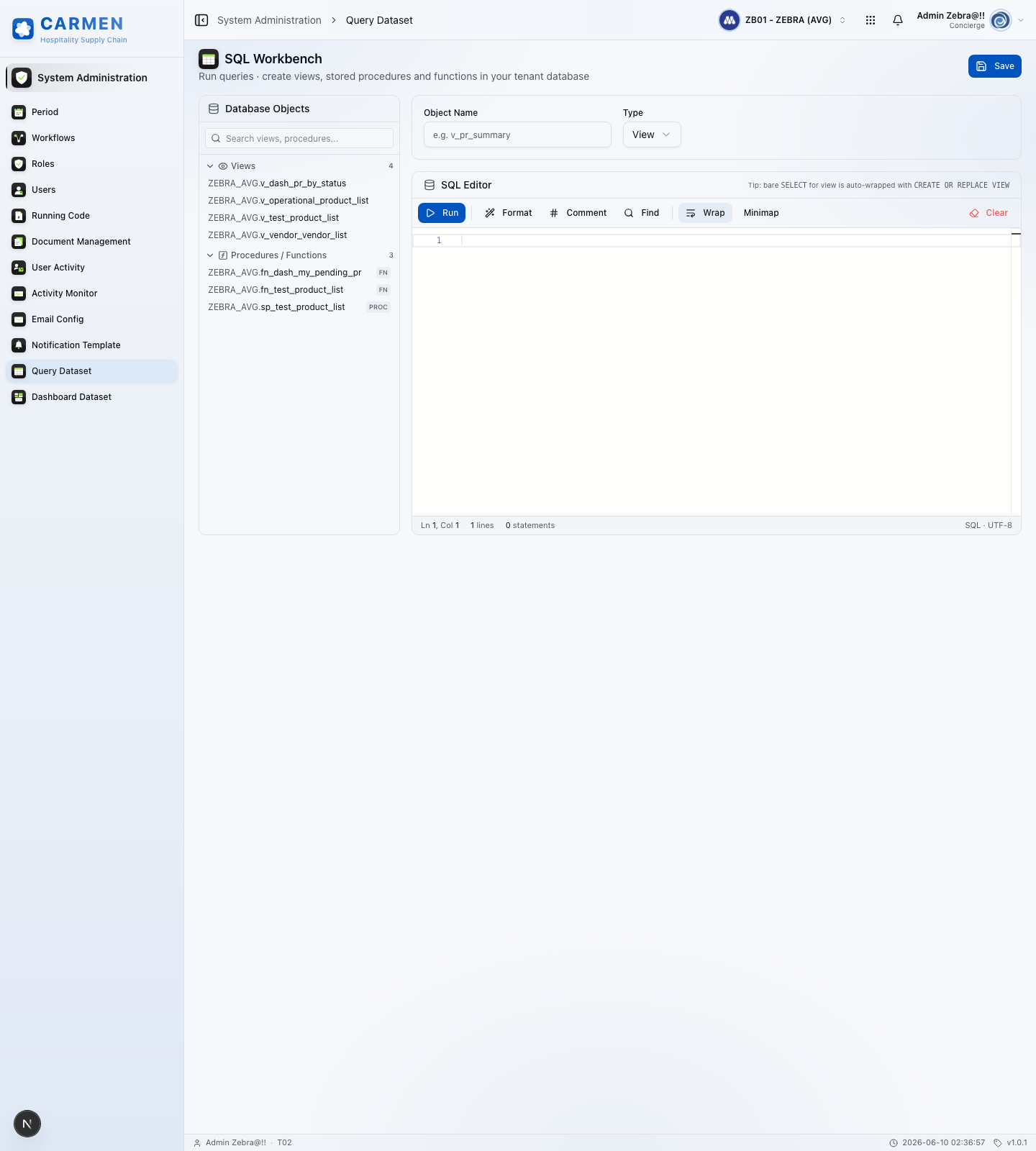
¶ 1. What & Who
Query Dataset (rendered as SQL Workbench in the UI) is the Sysadmin-only screen at /system-admin/query-dataset for running ad-hoc read-only queries and creating / browsing / dropping reusable database objects — views, stored procedures, and functions — directly inside the tenant database. Outputs become the data source for report templates and dashboard tiles.
Audience: Sysadmin only — non-admin roles never see the navigation entry. Unlike most Carmen tables, there is no tb_query_dataset row for each saved object — the registry is the live PostgreSQL catalog scoped to the tenant schema. The Workbench itself is stateless; edits are committed straight to the catalog, and reload-from-catalog is the recovery path.
The views, stored procedures, and functions authored here are the data sources the micro-data service executes at run time: a report or dashboard names one (by builder_key or template name), and micro-data resolves it via POST /api/datasets/execute, composes the WHERE clause from the supplied filters, fans the query across the requested business units, and returns a Dataset (columns + rows + totals + summary). See reporting-audit/report for the render side.
¶ 2. Common Tasks
| Task | Where | Notes |
|---|---|---|
Save a SELECT as a view |
Editor → enter bare SELECT + name, Type: View → Save | Server auto-wraps as CREATE OR REPLACE VIEW "<name>" AS … |
| Test a query before saving | Editor → Run | Read-only; only SELECT, WITH, SHOW, EXPLAIN, DESCRIBE allowed; 30 s timeout |
| Promote a saved widget query to a report | Recreate the SQL here as a view, then bind from reporting-audit/report | Widgets store ad-hoc SQL in tb_widget_workspace (author-scoped); views are tenant-wide |
| Browse existing objects | Left sidebar (DbObjectTree) → Tables / Views / Procedures / Functions |
Click to load definition into editor |
| Edit an existing view | Click in tree → loads pg_get_viewdef as CREATE OR REPLACE VIEW … |
Edit + Save commits the new text |
| Create a stored procedure / function | Editor → full DDL (CREATE OR REPLACE PROCEDURE/FUNCTION …) → Type: Stored Procedure / Function → Save |
Bare bodies are rejected — full DDL required |
| Drop an object | Load object in tree → Drop (only visible when loaded) | Browser confirm() dialog; no undo; bound reports will error |
¶ 3. Validation & Errors
| Symptom / Message | Cause | Action |
|---|---|---|
| "Only SELECT/WITH/SHOW/EXPLAIN allowed" on Run | Multi-statement script or write keyword | Remove INSERT/UPDATE/DELETE/DROP/TRUNCATE; allowMultiple: false |
| "Name is required" on save | Bare SELECT + Type View without a name |
Provide the view name (quoting applied for injection safety) |
| Procedure / function save rejected | Bare body supplied | Wrap in CREATE OR REPLACE PROCEDURE/FUNCTION … DDL |
statement_timeout after 30 s |
Query exceeded budget | Add filters / indexes; transaction budget 35 s, max-wait 8 s |
| "Database is busy" | Connection pool exhausted; one retry already attempted after 500 ms | Retry later; investigate concurrent load |
BigInt column returns as string in result |
Expected — JSON cannot natively carry bigint |
Cast in SQL if numeric handling needed downstream |
| Report errors after drop | Bound view / procedure removed from catalog | Re-create the object or update the report binding |
| 403 / route invisible | User lacks sql-query.execute / .save / .drop App IDs |
Grant via access-control/application-role |
¶ 4. Edge Cases
- Read-only Run, CREATE-only Save.
validateSqlSafetyenforces leading keywords client-side and re-checks server-side. Mixed scripts (start withCREATE, containDROPlater) are blocked by the multi-statement check. - Tenant-scoped credentials.
prismaTenantInstance(bu_code, user_id)provides the connection — every query and DDL runs inside the tenant's PostgreSQL role / schema; cross-tenant access is impossible at the database layer. - No version history in Carmen.
CREATE OR REPLACEdiscards previous text. Version-control DDL externally (git) and re-apply via Workbench. - Drop is destructive and immediate. Dropped catalog entry breaks any bound report or widget on next run.
- Bare-SELECT auto-wrap only for views. Procedures and functions require full DDL.
- BigInt safety. Result rows post-processed so
bigintcolumns are stringified; column order preserved from the first row.
¶ 5. Backing Service / Data Shape (Dev)
No bespoke table. The "data model" is the live PostgreSQL catalog plus a thin set of API endpoints.
¶ 5.1 PostgreSQL catalog projections (sidebar tree)
Four catalog queries scoped to current_schema():
tables     → pg_class    WHERE relkind = 'r'   (excluding extension-owned)
views      → pg_class    WHERE relkind = 'v'   (excluding extension-owned)
procedures → pg_proc     WHERE prokind IN ('p','f')
columns    → pg_attribute joined to pg_class for table/view/materialised-view cols
DbObjectsResponse shape:
{
  "tables":     [{ "schema": "tenant_t01", "name": "tb_purchase_request" }, ...],
  "views":      [{ "schema": "tenant_t01", "name": "v_pr_summary" }, ...],
  "procedures": [{ "schema": "tenant_t01", "name": "sp_close_period", "kind": "procedure" }, ...],
  "columns":    [{ "table": "tb_purchase_request", "column": "id", "data_type": "uuid" }, ...]
}
¶ 5.2 Object definition (edit flow)
Click an existing view / procedure / function → fetch pg_get_viewdef or pg_get_functiondef → load into editor as CREATE OR REPLACE … ready to re-save.
¶ 5.3 Save / Drop contract
POST /api/config/:bu_code/sql-query/save:
{
  "name": "v_pr_summary",                       // required when bare SELECT
  "sql_text": "SELECT id, doc_no FROM tb_pr",  // full DDL or bare SELECT
  "query_type": "view"                          // "view" | "stored_procedure" | "function"
}
DELETE /api/config/:bu_code/sql-query/db-objects?type=…&schema=…&name=… drops the named object.
¶ 5.4 Related (not the same)
tb_widget_workspace— author-scoped saved dashboard queries ({ name, query }); separate from catalog objects.tb_report_job.report_type/tb_report_schedule.report_type— string keys mapped to report definitions that may consume a view, but the mapping lives in the reports module.
¶ 6. Business Rules
- Sysadmin-only, gated by
sql-query.*App IDs. - Run is read-only:
validateSqlSafetyallows leadingSELECT,WITH,SHOW,EXPLAIN,DESCRIBE,DESC;allowMultiple: false. - Save is
CREATE-only: full DDL (allowedLeading: ['CREATE']) or bare SELECT for views (['SELECT', 'WITH']). Multi-statement scripts withDROPfurther down are blocked. - 30-second statement timeout inside a 35 s Prisma transaction budget (8 s max-wait).
- Tenant-scoped credentials via
prismaTenantInstance(bu_code, user_id). - Connection-pool retry — 500 ms wait, one retry, then "Database is busy".
- BigInt safety on response (stringified); column order preserved.
- Drop is destructive and confirmed via native
confirm(). - Bare-SELECT view requires a name; quoting applied for injection safety.
- Procedures / functions must be full DDL.
- No version history —
CREATE OR REPLACEdiscards previous text.
¶ 7. Cross-References
- reporting-audit/report — report templates bind to views created here.
- reporting-audit/widget — dashboard widgets execute against views, or store ad-hoc SQL in
tb_widget_workspace. - reporting-audit/schedule — scheduled reports consume the same views.
- access-control/permission —
sql-query.execute/.save/.dropApp IDs gate the screen. - system-config/period — period-close objects (
sp_close_period,v_period_snapshot) typically live here.
¶ 8. References
- Backend service:
../carmen-turborepo-backend-v2/apps/micro-business/src/sql-query/sql-query.service.ts—execute,saveDdl,listDbObjects,getDbObjectDefinition,dropDbObject. - Backend gateway:
../carmen-turborepo-backend-v2/apps/backend-gateway/src/config/config_sql-query/config_sql-query.controller.ts. - SQL safety validator:
../carmen-turborepo-backend-v2/apps/micro-business/src/sql-query/sql-validator.ts(frontend mirror:../carmen-inventory-frontend/lib/sql-validator.ts). - Frontend route:
../carmen-inventory-frontend/app/(root)/system-admin/query-dataset/page.tsxand_components/query-dataset-component.tsx. - Frontend supporting components:
_components/db-object-tree.tsx,_components/sql-editor.tsx,_components/result-panel.tsx. - Frontend hook:
../carmen-inventory-frontend/hooks/use-sql-query.ts—useDbObjects,useDbObjectDefinition,useSqlQueryExecute,useSqlQuerySave,useSqlQueryDrop. - Related Prisma:
tb_widget_workspace(lines ~5787-5801),tb_report_schedule(lines ~5685-5709),tb_report_job(lines ~5652-5683).